 |
DATAKIT SDK
V2026.4
|


|
|
DATAKIT SDK
V2026.4
|
|
Datakit API allows you to get data from CAD files, all covered by the same implementation.
Dtk_API is a singleton. That means only one session can be running at a time.
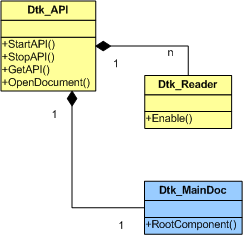
General process follows these steps :
You have to enable the readers you want to use calling static method Enable().
This will require linking against the corresponding libraries (please see Datakit Libraries and usage or individual reader pages)
Start the API by calling Dtk_API::StartAPI()
When API is started you can use Dtk_API::OpenDocument() method to read a file. This method :
From assembly tree root, you can browse components :
Dtk_API::ReadComponent() method to get component Construction tree (please see Handle Construction Tree for details) Dtk_API::EndComponent() From this construction tree, you can browse tree nodes :
Dtk_Node::GetNodeFullType() Dtk_Node::GetDtk_BodyPtr(), Dtk_Node::GetDtk_MeshPtr()...) to get the full data information.In order to properly free memory and re-initialize reader context :
Dtk_API::EndDocument() method to free data and memory used by the reader. Dtk_API::StopAPI() All classes except Dtk_API are handled via Smart Pointers.
They are deleted and freed automatically when they are out of scope.
// First You have to Enable the readers you want to use
// Then You have to Start DATAKIT API
Dtk_API * MyAPI = Dtk_API::StartAPI(TemporaryWorkingDirectory, errorStatus);
| Session Context (Dtk_API) Datakit Libraries and usage |
// You open the file and create Document with its assembly tree
Dtk_MainDocPtr inDocument;
err = MyAPI->OpenDocument(inInputFile, inDocument);
| File Context (Dtk_MainDoc) |
// First we get the root component in the document
Dtk_ComponentPtr RootComponent = inDocument->RootComponent();
// Deal with Dtk_Component tree then for each Prototype get the construction tree
Dtk_ErrorStatus err = MyAPI->ReadComponent(RootComponent, RootNode);
| Assembly Tree Context (Dtk_Component) Handle Assembly Tree |
// Deal with Dtk_Node tree then for each Node get associated data
Dtk_BodyPtr TmpBody = RootNode->Get_DtkBodyPtr();
| Construction Tree Context (Dtk_Node) Handle Construction Tree |
// We close the opened component
err = MyAPI->EndComponent(inComponent);
|
// We close the opened document
err = MyAPI->EndDocument(TmpDoc);
|
// At then end we stop datakit API
Dtk_API::StopAPI(MyAPI);
|