 |
DATAKIT SDK
V2026.4
|


|
|
DATAKIT SDK
V2026.4
|
|
You can access several kind of semantic information for Dtk_Dimension.
Each Dtk_Text of Dtk_Dimension has a DTK_Text_subtype.
DTK_Text_subtype lets you flag each text with one or more subtype(s) to semantically define the Dtk_Text.
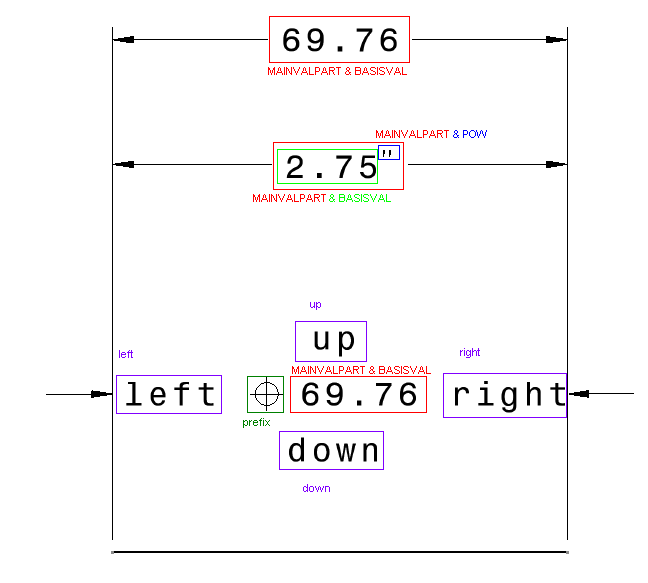
On this picture, you can see the easiest cases:
Dtk_Dimension is a really basic case:Dtk_Dimension contains 2 texts : '2.75' and ' " '.Dtk_Dimension some others subtypes not included into the mainvalpart - Up/Left/Right/Down/Prefix -.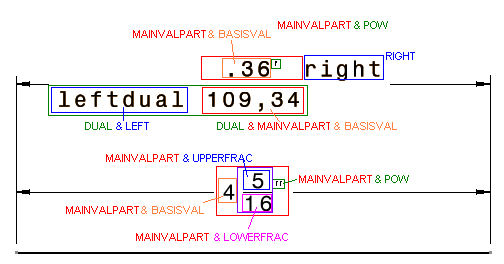
This second picture shows you others DTK_Text_subtype:
Dtk_Dimension is a dual dimension.Dtk_Dimension is a fraction form.Most complex cases follow on the 2 next pictures:
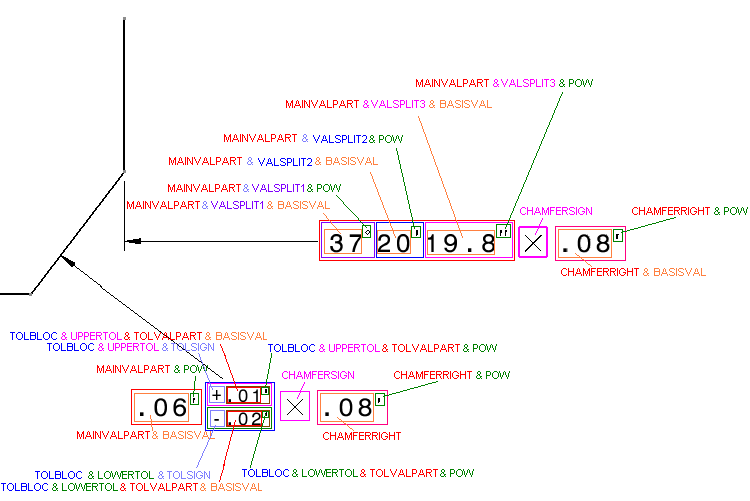
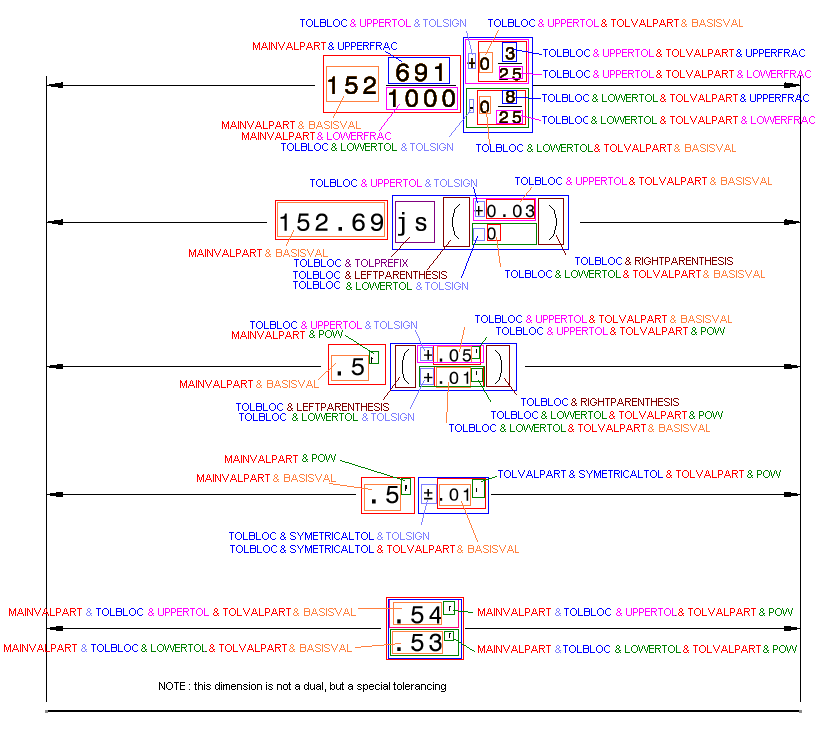
Each Dtk_Text has also a Dtk_Info giving you additional information.
You can access it using method Dtk_Info::FindAttribute (see sample below).
DtkUnit gives the unit (as string) of the displayed value in the Dtk_Text UnitType should be one of these values :DTK_UNIT_MM, DTK_UNIT_MICRON DTK_UNIT_CM DTK_UNIT_M DTK_UNIT_KM DTK_UNIT_INCH DTK_UNIT_RADIAN DTK_UNIT_DMS DTK_UNIT_GRADE DMS (degree minuts seconds) DtkOriginalValue gives the semantic numerical value corresponding to main value of dimension.DtkOriginalTolMin gives the semantic numerical value corresponding to the minimum toleranceDtkOriginalTolMax gives the semantic numerical value corresponding to the maximum toleranceDtkOriginalTolMinSign gives the sign of the minimum toleranceDtkOriginalTolMaxSign gives the sign of the maximum toleranceDtkOriginalTolAbsolute gives a boolean to tell if tolerances values are relative to the original value or absoluteDtkOriginalDataUnit gives unit of semantic numerical value as string like DtkUnit DtkSeparator gives the separator character for number '.' or ',' DtkDisplayFinalZeros gives a boolean for Final Zero display DtkDisplayLeadingZeros gives a boolean for Leading Zero display DtkPrecision gives a double for precision to display
Following reader, this information can also be set on the Dtk_CompositeText.